
When Traffic Parrot receives a request via any protocol or technology like HTTP, JMS, gRPC and others, it will try to simulate the system it is replacing by sending back a response to the client that sent the request.
To decide which response to send, it will go through all the request to response mappings it has available to find the response to be returned.
A request to response mapping defines which response to return given a request.
For example, in HTTP, you could say:
For any request to URL '/hello' that is a GET request return a response with body 'Hello World!'
The way you do that in Traffic Parrot is by using the user interface to record mappings, import them or add them manually.
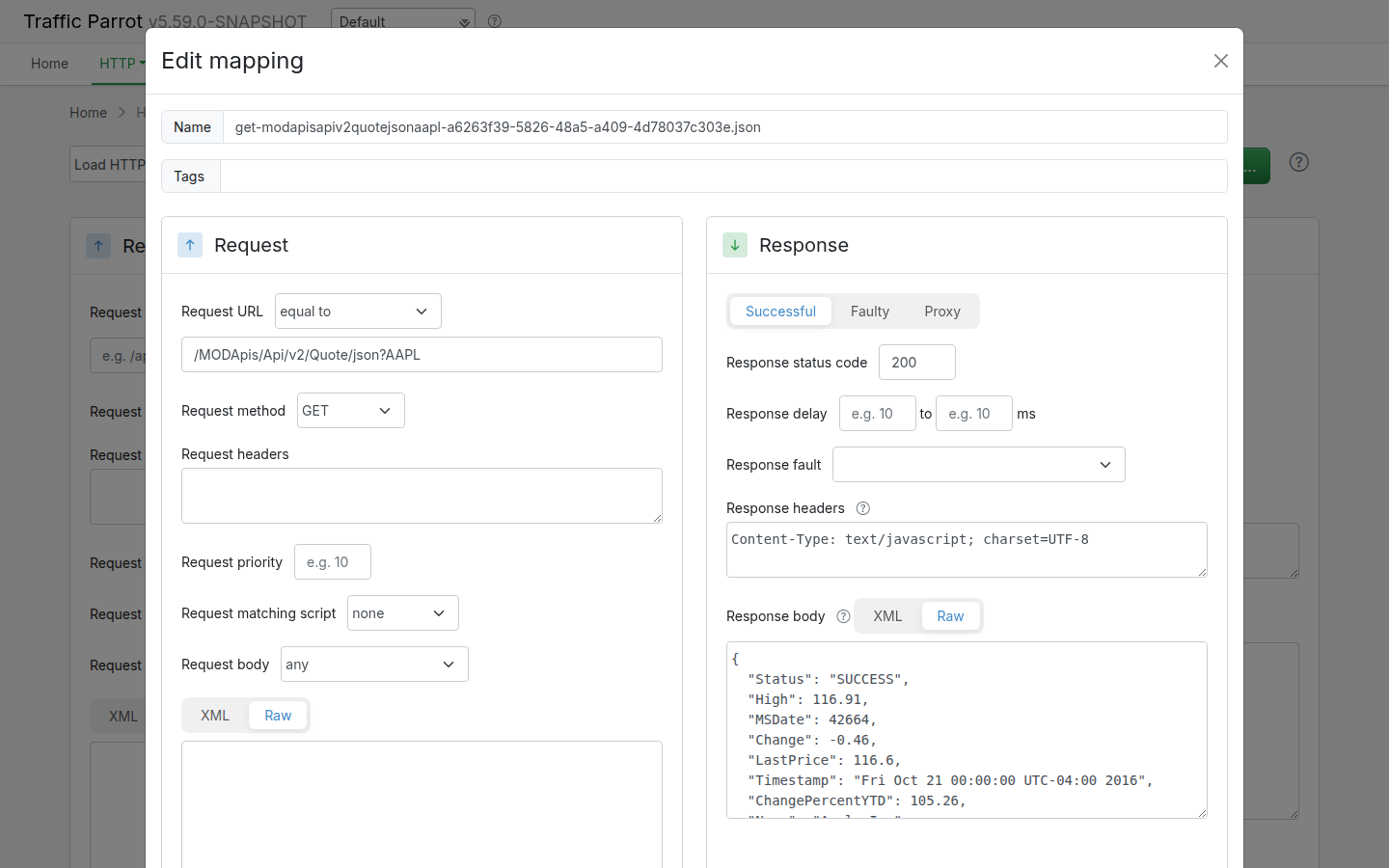
{
  "id" : "a6263f39-5826-48a5-a409-4d78037c303e",
  "request" : {
    "url" : "/MODApis/Api/v2/Quote/json?AAPL",
    "method" : "GET"
  },
  "response" : {
    "status" : 200,
    "body" : "{\r\n  \"Status\": \"SUCCESS\",\r\n  \"High\": 116.91,\r\n  \"MSDate\": 42664,\r\n  \"Change\": -0.46,\r\n  \"LastPrice\": 116.6,\r\n  \"Timestamp\": \"Fri Oct 21 00:00:00 UTC-04:00 2016\",\r\n  \"ChangePercentYTD\": 105.26,\r\n  \"Name\": \"Apple Inc\",\r\n  \"Open\": 116.81,\r\n  \"Volume\": 23192665,\r\n  \"Low\": 116.28,\r\n  \"ChangeYTD\": 105.26,\r\n  \"ChangePercent\": -0.3929608748,\r\n  \"MarketCap\": 628292453800\r\n}",
    "headers" : {
      "Content-Type" : "text/javascript; charset=UTF-8"
    }
  },
  "uuid" : "a6263f39-5826-48a5-a409-4d78037c303e"
}
Traffic Parrot support matching attributes of requests using the following matchers.
For the complete cross-protocol list of every matcher and its mapping JSON options, including matchers that are not shown in the editor dropdowns, see the matchers reference further down this page.
| Protocol/technology | Matchers available |
|---|---|
| HTTP(S) | list of HTTP(S) matchers |
| JMS | list of JMS matchers |
| Native IBM MQ | list of MQ matchers |
| gRPC | list of gRPC matchers |
| Thrift | list of Thrift matchers |
| Files | list of files matchers |
Here is a collection of matcher examples that cover typical request matching use cases.
| Use case | JSON to match | JSONPath |
|---|---|---|
| Has field that exists, even if it contains a null value | {
"field" : null
} |
$[?(@.field)] |
| Does not have a particular field at all | {
"other" : "any"
} |
$[?(!(@.field))] |
| Has field matching regular expression | {
"name" : "John"
} |
$[?(@.name =~ /^J[a-z]+$/)] |
| Has field not matching regular expression | {
"name" : "Other"
} |
$[?(!(@.name =~ /^J[a-z]+$/))] |
| Has field with value equal to | {
"name" : "John"
} |
$[?(@.name == 'John')] |
| Has multiple fields with value equal to | {
"name" : "John",
"lastName" : "Smith"
} |
$[?(@.name == 'John' && @.lastName == 'Smith')] |
| Has field with value equal to either | {
"name" : "Bob"
}{
"name" : "John"
} |
$[?(@.name == 'John' || @.name == 'Bob')] |
| Has array containing field with value equal to | {
"root" : {
"items" : [
{
"id": "1111"
}
]
}
} |
$.root[?('1' in @.items[*].id)] |
| Has array containing fields with values equal to | {
"root" : {
"items" : [
{
"id": "1"
},
{
"id": "2"
}
]
}
} |
$.root[?('1' in @.items[*].id && '2' in @.items[*].id)] |
| Has fields at multiple depths | {
"id": 1,
"items": [
{
"id": 2,
}
]
} |
$[?(@.id == 1 && 2 in @.items[*].id)] |
A request to response mapping uses one or more matchers to decide whether an incoming request matches. This section is the complete reference of every matcher Traffic Parrot understands in mapping JSON, together with a copy-ready example for each.
The mapping editor in the web user interface offers a subset of the available matchers through its dropdown menus — the most common ones for each protocol. Additional matchers, inherited from the bundled request-matching engine, are not shown in those dropdowns but can still be used by editing the mapping JSON directly (on disk in the mappings folder, or through the import and API surfaces). Those are listed in the JSON-only matchers section and are each labelled JSON-only.
Matchers marked Traffic Parrot extension are added by Traffic Parrot on top of the bundled engine. The remaining matchers are inherited from the bundled request-matching engine.
Where each matcher applies. Not every matcher makes sense on every
protocol, so each entry below has an Applies to note. In the examples,
body matchers appear inside a bodyPatterns array on the
request and URL matchers appear as top-level request
fields, which is how they are stored in the mapping JSON.
These matchers are available from the dropdown menus in the mapping editor. The Applies to column shows which editor surfaces offer each one. A matcher may still be usable in mapping JSON for a protocol where the editor does not list it, but the column reflects what the editor exposes.
| Matcher (JSON key) | Description | Applies to |
|---|---|---|
any / anything | Matches any body, including an empty one. The editor shows this as any; in JSON the HTTP and gRPC forms use anything via an empty body-patterns list, while the messaging form uses the anything key. | HTTP body, JMS, Native IBM MQ, gRPC payload |
equalTo | Exact, character-for-character string equality. | HTTP body, JMS, Native IBM MQ, File name |
contains | The body contains the given substring. | HTTP body, JMS, Native IBM MQ, gRPC payload, File name |
doesNotContain | The body does not contain the given substring. | HTTP body, JMS, Native IBM MQ, gRPC payload, File name |
matches | The body matches the given regular expression. | HTTP body, JMS, Native IBM MQ, gRPC payload, File name |
doesNotMatch | The body does not match the given regular expression. | HTTP body, JMS, Native IBM MQ, gRPC payload, File name |
equalToJson | Semantic JSON equality — the body and the expected value represent the same JSON document regardless of formatting. | HTTP body, JMS, Native IBM MQ, gRPC payload |
matchesJson Traffic Parrot extension | Semantic JSON comparison with the expected value supplied as inline JSON rather than an escaped string. | HTTP body, JMS, Native IBM MQ, gRPC payload |
matchesJsonPath | A JSONPath expression selects a value from the body; the request matches when the expression resolves. | HTTP body, JMS, Native IBM MQ, gRPC payload |
equalToXml | Semantic XML equality, ignoring insignificant whitespace and attribute order. | HTTP body, JMS, Native IBM MQ |
matchesXml Traffic Parrot extension | Matches an XML body against an XML template, comparing element and attribute values. | HTTP body, JMS, Native IBM MQ |
matchesXPath | An XPath expression selects a node from the XML body; the request matches when the node is present (optionally with a value sub-matcher). | HTTP body, JMS, Native IBM MQ |
matchesSwiftField Traffic Parrot extension | Extracts a SWIFT financial-message field by tag and matches its value against a regular expression. | JMS, Native IBM MQ |
matchesFixField Traffic Parrot extension | Extracts a FIX financial-protocol field by tag number and matches its value against a regular expression. | JMS, Native IBM MQ |
binaryEqualTo | Byte-for-byte equality against a Base64-encoded expected value, for binary message bodies. | JMS only |
absent | Matches when the body is absent (no request body present). | HTTP body |
HTTP requests also support four URL matchers, chosen from the Request URL
dropdown. These are top-level request fields rather than body patterns.
| Matcher (JSON key) | Description | Applies to |
|---|---|---|
urlEqualTo | The full URL, including query string, equals the given value. | HTTP URL |
urlMatching | The full URL, including query string, matches the given regular expression. | HTTP URL |
urlPathEqualTo | The URL path, ignoring the query string, equals the given value. | HTTP URL |
urlPathMatching | The URL path, ignoring the query string, matches the given regular expression. | HTTP URL |
Each body matcher is one entry in the bodyPatterns array. The HTTP
examples below show the matcher in a minimal mapping; the same body-pattern entry
is used in the JMS, Native IBM MQ and gRPC mappings (within their respective
request shapes).
equalTo{
"request": {
"method": "POST",
"url": "/orders",
"bodyPatterns": [
{ "equalTo": "expected request body" }
]
},
"response": { "status": 200 }
}contains{
"request": {
"bodyPatterns": [
{ "contains": "ORDER-" }
]
},
"response": { "status": 200 }
}doesNotContain{
"request": {
"bodyPatterns": [
{ "doesNotContain": "DRAFT" }
]
},
"response": { "status": 200 }
}matches{
"request": {
"bodyPatterns": [
{ "matches": "ORDER-[0-9]{6}" }
]
},
"response": { "status": 200 }
}doesNotMatch{
"request": {
"bodyPatterns": [
{ "doesNotMatch": ".*TEST.*" }
]
},
"response": { "status": 200 }
}equalToJson{
"request": {
"bodyPatterns": [
{ "equalToJson": "{ \"id\": 1, \"name\": \"Widget\" }" }
]
},
"response": { "status": 200 }
}matchesJson Traffic Parrot extensionThe expected value is supplied as inline JSON, so it does not need to be escaped into a string.
{
  "request": {
    "bodyPatterns": [
      { "matchesJson": { "id": 1, "name": "Widget" } }
    ]
  },
  "response": { "status": 200 }
}matchesJsonPath{
"request": {
"bodyPatterns": [
{ "matchesJsonPath": "$.customer.id" }
]
},
"response": { "status": 200 }
}equalToXml{
"request": {
"bodyPatterns": [
{ "equalToXml": "<order><id>1</id></order>" }
]
},
"response": { "status": 200 }
}matchesXml Traffic Parrot extension{
"request": {
"bodyPatterns": [
{ "matchesXml": "<order><id>1</id></order>" }
]
},
"response": { "status": 200 }
}matchesXPath{
"request": {
"bodyPatterns": [
{ "matchesXPath": "//order/id/text()" }
]
},
"response": { "status": 200 }
}matchesSwiftField Traffic Parrot extensionAvailable on the JMS and Native IBM MQ message body. The field is the SWIFT field tag; matches is a regular expression applied to that field's value.
{
  "request": {
    "bodyPatterns": [
      { "matchesSwiftField": { "field": "20", "matches": "TXNREF.*" } }
    ]
  },
  "response": { "status": 200 }
}
matchesFixField Traffic Parrot extensionAvailable on the JMS and Native IBM MQ message body. The field is the FIX tag number; matches is a regular expression applied to that tag's value.
{
  "request": {
    "bodyPatterns": [
      { "matchesFixField": { "field": "35", "matches": "D" } }
    ]
  },
  "response": { "status": 200 }
}binaryEqualToOffered by the JMS editor for binary (bytes) message bodies. The expected value is Base64-encoded.
{
  "request": {
    "bodyPatterns": [
      { "binaryEqualTo": "AQIDBA==" }
    ]
  },
  "response": { "status": 200 }
}absent{
"request": {
"url": "/health",
"bodyPatterns": [
{ "absent": true }
]
},
"response": { "status": 200 }
}urlEqualTo{
"request": {
"method": "GET",
"urlEqualTo": "/orders?status=open"
},
"response": { "status": 200 }
}urlMatching{
"request": {
"method": "GET",
"urlMatching": "/orders\\?status=(open|closed)"
},
"response": { "status": 200 }
}urlPathEqualTo{
"request": {
"method": "GET",
"urlPathEqualTo": "/orders"
},
"response": { "status": 200 }
}urlPathMatching{
"request": {
"method": "GET",
"urlPathMatching": "/orders/[0-9]+"
},
"response": { "status": 200 }
}The matchers below are inherited from the bundled request-matching engine (and, where noted, are Traffic Parrot extensions) but are not offered in any editor dropdown. Use them by editing the mapping JSON directly — in the mapping file on disk, through import, or through the API. Each is labelled JSON-only. Several are flag variants of an editor matcher: the same matcher key plus extra sibling fields that the editor does not expose.
equalTo with caseInsensitive JSON-onlyCase-insensitive exact match. Add the sibling flag caseInsensitive next to equalTo.
{
  "request": {
    "bodyPatterns": [
      { "equalTo": "expected body", "caseInsensitive": true }
    ]
  },
  "response": { "status": 200 }
}
equalToJson flags JSON-only
ignoreArrayOrder treats two JSON arrays with the same elements in a
different order as equal. ignoreExtraElements ignores additional
fields in the actual body that are not present in the expected value. Both default
to false and are added as siblings of equalToJson.
{
  "request": {
    "bodyPatterns": [
      {
        "equalToJson": "{ \"items\": [\"a\", \"b\"] }",
        "ignoreArrayOrder": true,
        "ignoreExtraElements": true
      }
    ]
  },
  "response": { "status": 200 }
}
matchesJsonSchema JSON-only
Validates the request body against a JSON Schema. The optional
schemaVersion sibling selects the schema dialect; valid values are
V4, V6, V7, V201909 and
V202012. When omitted, the default is V202012.
{
  "request": {
    "bodyPatterns": [
      {
        "matchesJsonSchema": "{ \"type\": \"object\", \"required\": [\"id\"], \"properties\": { \"id\": { \"type\": \"integer\" } } }",
        "schemaVersion": "V7"
      }
    ]
  },
  "response": { "status": 200 }
}
equalToXml advanced flags JSON-only
equalToXml accepts several optional sibling flags that the editor does
not expose:
enablePlaceholders — allow placeholder tokens in the expected XML to match arbitrary values.placeholderOpeningDelimiterRegex / placeholderClosingDelimiterRegex — customise the placeholder delimiters (default ${ and }).exemptedComparisons — an array of XML comparison types to skip (for example NAMESPACE_URI, SCHEMA_LOCATION).ignoreOrderOfSameNode — treat repeated sibling elements with the same name as order-independent.namespaceAwareness — how strictly XML namespaces are compared; valid values are STRICT, LEGACY and NONE.{
"request": {
"bodyPatterns": [
{
"equalToXml": "<order><id>${anything}</id></order>",
"enablePlaceholders": true,
"placeholderOpeningDelimiterRegex": "\\$\\{",
"placeholderClosingDelimiterRegex": "\\}",
"exemptedComparisons": ["NAMESPACE_URI", "SCHEMA_LOCATION"],
"ignoreOrderOfSameNode": true,
"namespaceAwareness": "LEGACY"
}
]
},
"response": { "status": 200 }
}matchesJsonPath advanced form JSON-only
The advanced form takes an object with an expression plus an inner
value sub-matcher, so you can assert the value selected by the JSONPath rather than
only its presence. The inner sub-matcher can be any string-value matcher
(equalTo, contains, matches, and so on).
{
  "request": {
    "bodyPatterns": [
      {
        "matchesJsonPath": {
          "expression": "$.customer.id",
          "equalTo": "12345"
        }
      }
    ]
  },
  "response": { "status": 200 }
}
matchesXPath advanced form JSON-only
The advanced form takes an expression plus an inner value sub-matcher,
and optionally an xPathNamespaces map to bind namespace prefixes used in
the expression.
{
  "request": {
    "bodyPatterns": [
      {
        "matchesXPath": {
          "expression": "//s:order/s:id/text()",
          "contains": "1"
        },
        "xPathNamespaces": {
          "s": "http://example.com/shop"
        }
      }
    ]
  },
  "response": { "status": 200 }
}before, after, equalToDateTime JSON-only
Compare a date/time in the request against an expected moment. before
matches values earlier than the expected, after matches later values,
and equalToDateTime matches the same moment. The expected value may be
a literal timestamp or an offset expression such as now +3 days.
Optional sibling flags:
actualFormat — the date/time format of the value in the request (when it is not ISO-8601).truncateExpected / truncateActual — truncate before comparing; valid units are YEARS, MONTHS, DAYS, HOURS, MINUTES, SECONDS (and the broader truncation forms such as FIRST_DAY_OF_MONTH).applyTruncationLast — apply truncation after the offset rather than before.expectedOffset / expectedOffsetUnit — shift the expected moment by a number of units (SECONDS, MINUTES, HOURS, DAYS, MONTHS, YEARS).{
"request": {
"bodyPatterns": [
{
"before": "now +1 days",
"actualFormat": "yyyy-MM-dd'T'HH:mm:ss",
"truncateExpected": "DAYS",
"expectedOffset": 1,
"expectedOffsetUnit": "DAYS"
}
]
},
"response": { "status": 200 }
}and, or, not JSON-only
Compose sub-matchers. and and or take an array of
sub-matchers; the body matches when all (and) or any (or)
of them match. not takes a single sub-matcher and matches when that
sub-matcher does not.
{
  "request": {
    "bodyPatterns": [
      {
        "and": [
          { "contains": "ORDER-" },
          { "doesNotContain": "DRAFT" }
        ]
      }
    ]
  },
  "response": { "status": 200 }
}
{
"request": {
"bodyPatterns": [
{
"or": [
{ "equalTo": "PING" },
{ "equalTo": "HEALTHCHECK" }
]
}
]
},
"response": { "status": 200 }
}{
"request": {
"bodyPatterns": [
{
"not": { "contains": "TEST" }
}
]
},
"response": { "status": 200 }
}matchesPathTemplate JSON-only
A string-value matcher that matches a value against a path template with named
variables, such as /users/{id}. The value matches when it fits the
template's shape regardless of the concrete variable values. It is used wherever a
string-value matcher is accepted, for example as the value sub-matcher of a
matchesJsonPath or matchesXPath expression that selects a
path string from the body.
{
  "request": {
    "bodyPatterns": [
      {
        "matchesJsonPath": {
          "expression": "$.resourcePath",
          "matchesPathTemplate": "/users/{id}"
        }
      }
    ]
  },
  "response": { "status": 200 }
}
matchesGraphQL Traffic Parrot extension JSON-only
Matches a GraphQL request body (a JSON document with a query field) by
comparing the canonical form of the incoming query against the expected query, so two
queries that differ only in insignificant whitespace, field order or argument order
are treated as equal. GraphQL requests are typically sent as an HTTP POST body.
{
  "request": {
    "method": "POST",
    "url": "/graphql",
    "bodyPatterns": [
      { "matchesGraphQL": "query { user(id: 1) { name email } }" }
    ]
  },
  "response": { "status": 200 }
}This reference is maintained by hand. It lists every matcher Traffic Parrot accepts in mapping JSON for the version of the documentation you are reading; the set of matchers can change between releases, so always read the page that matches your installed version.
For the matchers offered by each protocol's editor, see the per-protocol pages linked from Available request matchers above.
Traffic Parrot stores request to response mappings on the filesystem.
| Protocol/technology | Mappings location |
|---|---|
| HTTP(S) | mappings and __files (where it stores bodies of responses during a recording) |
| JMS | jms-mappings |
| Native IBM MQ | ibm-mq-mappings |
| gRPC | grpc-mappings |
| Thrift | thrift-mappings |
| Files | file-mappings |
You can change the root directory by changing the value of the trafficparrot.virtualservice.trafficFilesRootUrl property.
XPath (XML Path Language) is a query language for finding and selecting elements in an XML document. Traffic Parrot allows to match requests using XPath.
We recommend the following reading to users who would like to take their XPaths skills to an advanced level: